By Octagon Cards · Updated
How to identify UFC cards from a photo
Identify UFC cards from a photo with Octagon, then check the year, set, card number and parallel against real examples before trusting a match.
To identify UFC cards from a photo, photograph the front, open the match in the Octagon scanner, and confirm its year, set, card number and parallel against the card in your hand. A matching fight photo can appear on several editions. Check the colour and any serial number before using the price.
As of 23 October 2026, scanning is free and does not require sign-in. Adding matched cards to your portfolio requires an account. The scanner helps find a catalogue match; it does not authenticate a card or assign a professional condition grade.
How to identify UFC cards from a photo
- Open the scanner. On a phone, choose Enable camera or Upload a photo instead. On a computer, choose Choose photos, drop your photos into the scanner, or use Use camera.
- Use one card front per photo. Keep the whole card in frame and photograph it straight on, with enough light to read the name and design.
- Open the result and compare the suggested card with your physical copy. Check the release and printed number, then confirm the parallel if the scanner asks.
- Open the exact card page to inspect its checklist details and dated price evidence.
You can select several photos, but each photo should show one card. That lets you review each result against a particular copy rather than a pile of overlapping cards.
If the browser blocks the camera, you can upload an existing photo. Move the light or change the angle if glare hides the foil, signature or printed text. A clearer view gives you more evidence for checking the result, even when the scanner has already suggested a match.
Which details should you check on the result?
Use Jon Jones and Andre Gusmao's 2009 Topps UFC Round 2 #101 as an example. The landscape card shows both fighters and a UFC Debut mark. Its front also shows a date from the fight, which can mislead a year-based search.
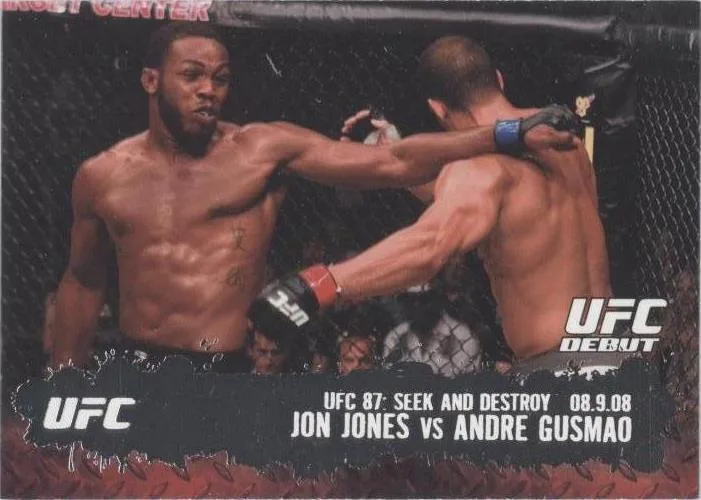
| Detail | What to verify on this example |
|---|---|
| Fighter names | Jon Jones and Andre Gusmao appear on the same bout card. |
| Product | The release is 2009 Topps UFC Round 2. |
| Card number | Match #101 against the card and checklist. |
| Front date | The printed 08.9.08 is the fight date, not the product year. |
| Edition | Base and Gold are separate catalogue entries. |
UFC's career history places Jones's debut against Gusmao at UFC 87 on 9 August 2008. The Round 2 checklist identifies the card as a 2009 product. Turn the physical card over to read its printed number if the front leaves the identity unclear.
For the difference between this bout card and Jones's first autograph, see the Jon Jones rookie-card guide.
How do you confirm the parallel?
Compare the design and finish as well as the photograph. The Gold #101 uses the same fight image, with a gold-toned nameplate where the base card has a dark one.

Octagon's catalogue lists both these editions as unnumbered as of 23 October 2026. The name Gold does not imply a particular serial limit. Use the Round 2 base checklist to check the release-specific edition.
When the scanner shows Confirm the parallel or Pick your serial or colour, compare those choices with the physical card. A catalogue thumbnail may represent a related parallel, so its colour alone is not a reason to select that edition. A price may remain unavailable until you settle the version.
For a numbered card, read the stamp on the card itself. The stamp and the release checklist should support the choice together. If either is unclear, keep the edition unresolved until you have a better photo or can inspect the card.
What if the match is wrong or no match appears?
Use Not quite right? Search manually to look for the card by its printed details. Start with the fighter and product, then narrow by year and card number. The checklist index is another route when you know the release but cannot find the individual card.
A failed match does not establish that the card is fake or worthless. A photo may omit the detail that separates two editions, or the available catalogue evidence may not settle it. Do not choose the closest-looking expensive result just to get a value.
The same applies to condition. A successful catalogue match does not tell you whether your corners, edges or surface would receive a particular grade. Keep identification, condition assessment and price comparison as separate checks.
What can you do with the identified card?
Open its card page and compare the dated estimate with recorded sales. Check the selected parallel again before comparing raw and graded copies; the UFC card valuation guide walks through that step with real sales.
You can sign in to save matched cards to your portfolio. If you only need the identity and card details, continue directly from the scanner to the matching catalogue page.